Shearora
A complete Flutter app for one salon or barbershop, with a Laravel admin panel and a one-page product website in the same download. Everything runs on bundled sample data out of the box, so you can open it, look at every screen and start re-skinning before you decide anything about a server.
1What this is
27 screens 12 painters 3 dependencies 0 image assets
Shearora is a customer-facing booking app for a single shop. Not a marketplace: the stylists, the services, the opening hours and the walk-in queue all belong to one salon, which is the shop that publishes the app. That single choice is why there is no map SDK, no commission split and no "find salons near me" anywhere in the project, and it is also why the walk-in queue can exist at all. A marketplace has nobody to queue for.
It is built around four things a real shop does that a booking calendar cannot express: fitting a cut into the gap that is actually there, writing down the guard numbers so nobody has to describe them again, running a walk-in line alongside the book, and knowing that a haircut has a shelf life. Chapter 4 covers all four.
What comes in the download
| Folder | What it is |
|---|---|
shearora_ui_kit/ |
The Flutter app. Runs on its own with no server. |
backend/ |
A Laravel 13 admin panel and REST API for the shop's own rows. Optional to deploy, included either way. |
landing/ |
A one-page product website for the app: static HTML, no build step, no external requests. |
2Get it running
You need the Flutter SDK, version 3.29 or newer, and either Xcode or Android Studio. Nothing else: there is no key to obtain, no account to make and no server to stand up first.
From a terminal
Unzip the download, then from inside the app folder:
flutter pub get
flutter run
The app opens on its splash screen, walks itself to a three-page introduction, and lands on a sign-in form that is already filled in. Tap Sign in. With no server configured nothing is checked and nothing is sent anywhere, which the line under the form says in as many words.
demo@shearora.app / demo1234, pre-filled.
Empty fields work too. The same pair is what the back end's seeder
creates, so it keeps working once you point the app at a server.
Without a terminal
- Open Android Studio or VS Code.
- File → Open, and choose the
shearora_ui_kitfolder from the unzipped download. Open the folder itself, not the zip and not the folder above it. - Wait for the editor to finish fetching packages. Android Studio does this on its own; VS Code offers a Get packages prompt at the bottom right.
- Pick a device or simulator from the toolbar, then press Run.
If the run button is greyed out, the editor has not finished indexing yet. Give it a minute; the Dart plugin reports when it is ready.
3Every screen
Twenty-seven screens, and this is all of them. Some appear more than once below because a screen with a sheet open, or scrolled, or in the dark theme, is a state you will need to look at while you are working.
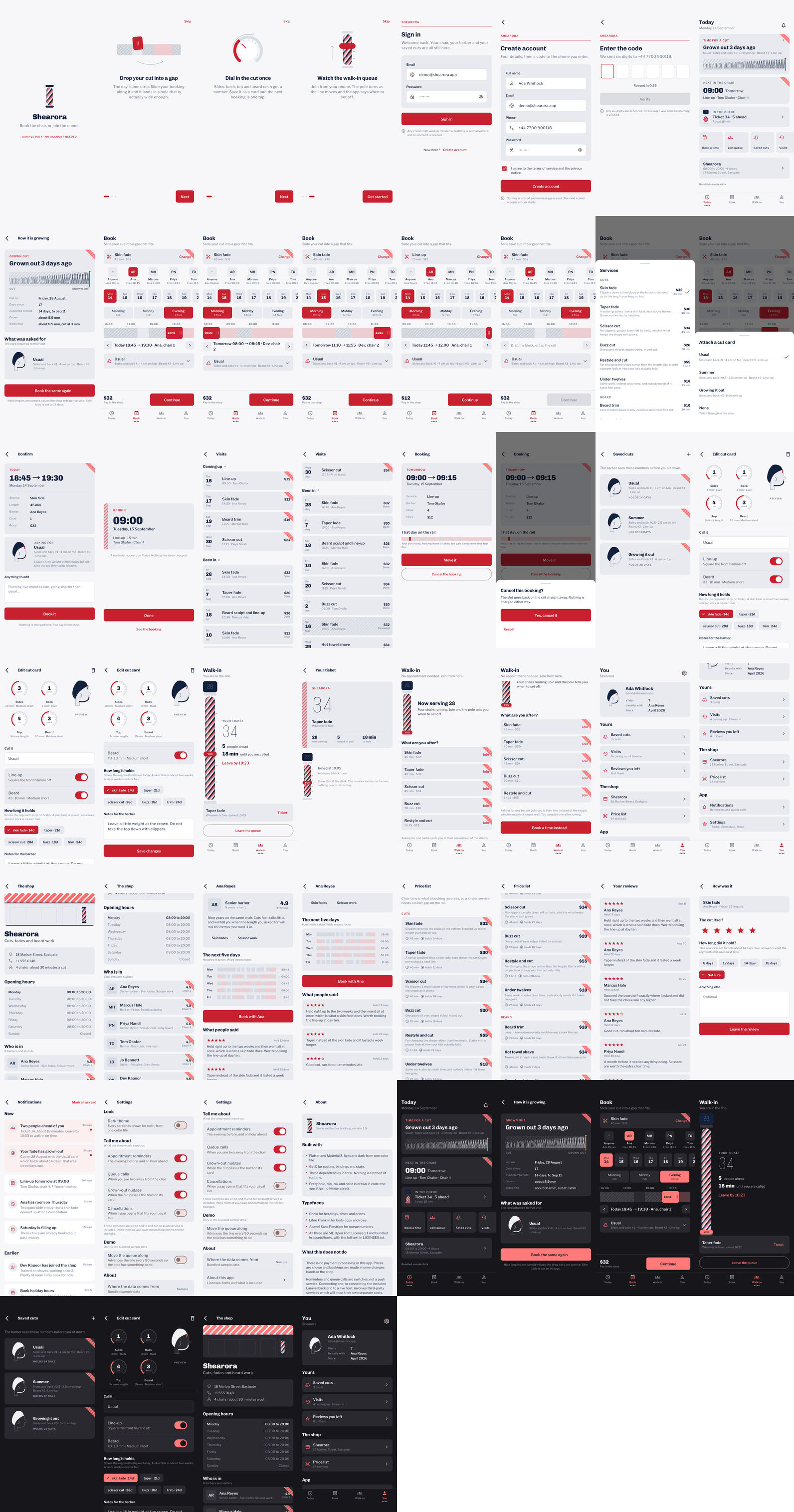
integration_test/screenshots_test.dart, which opens every
route in order. Run it yourself and it overwrites these: it is how the
screenshots stay honest as you change things.How they are grouped
| Tab | What lives there |
|---|---|
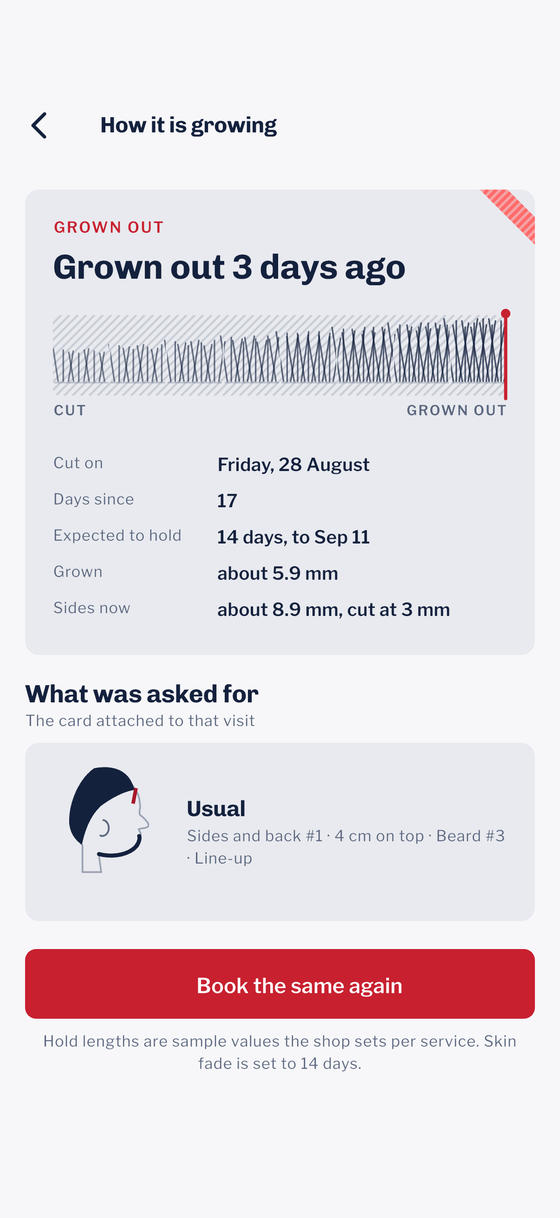
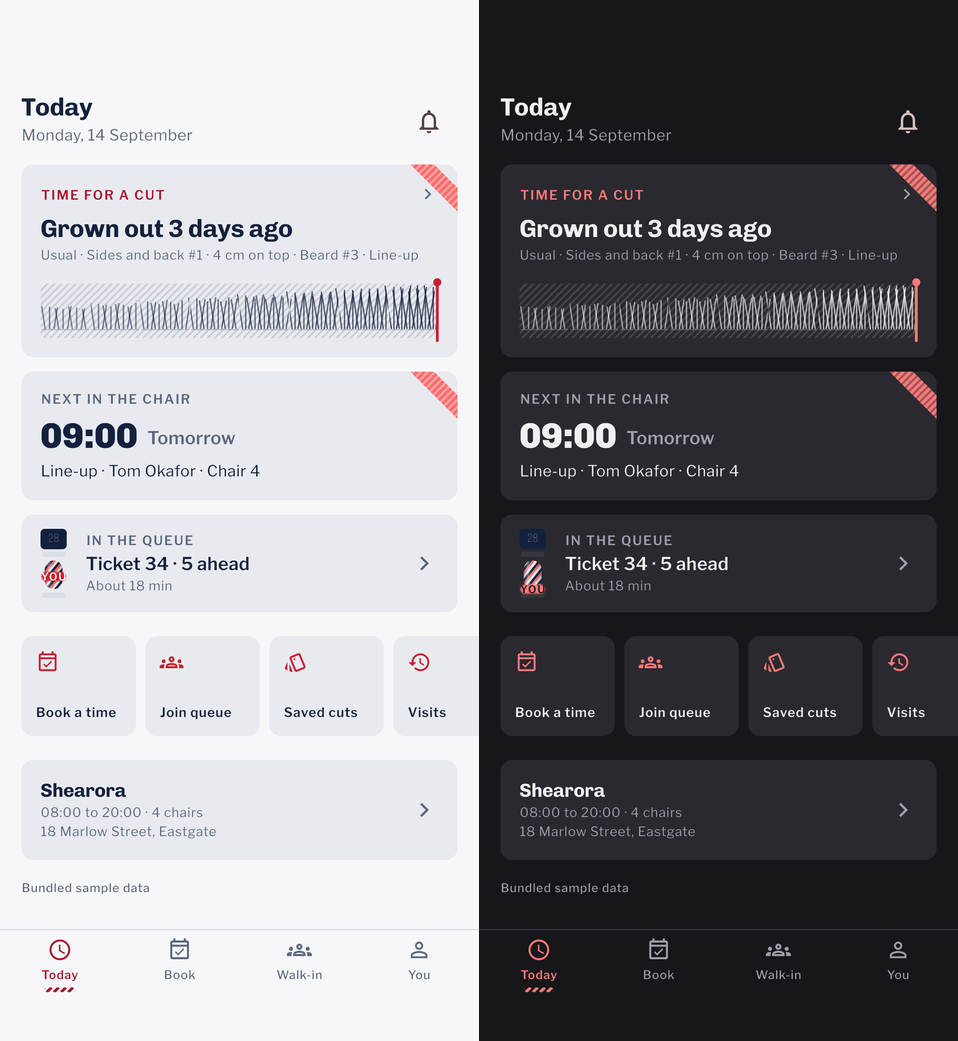
| Today | How grown out you are, the next appointment, the live queue ticket, and the shop's card. It opens on the regrowth strip rather than on a list, because that is the thing that decides whether you need the app at all today. |
| Book | Service, barber, day, window and the time rail, on one page. Then a confirmation screen and a ticket. |
| Walk-in | The queue, in its two states: in the line, or not. Plus the ticket itself at the size you would hold it. |
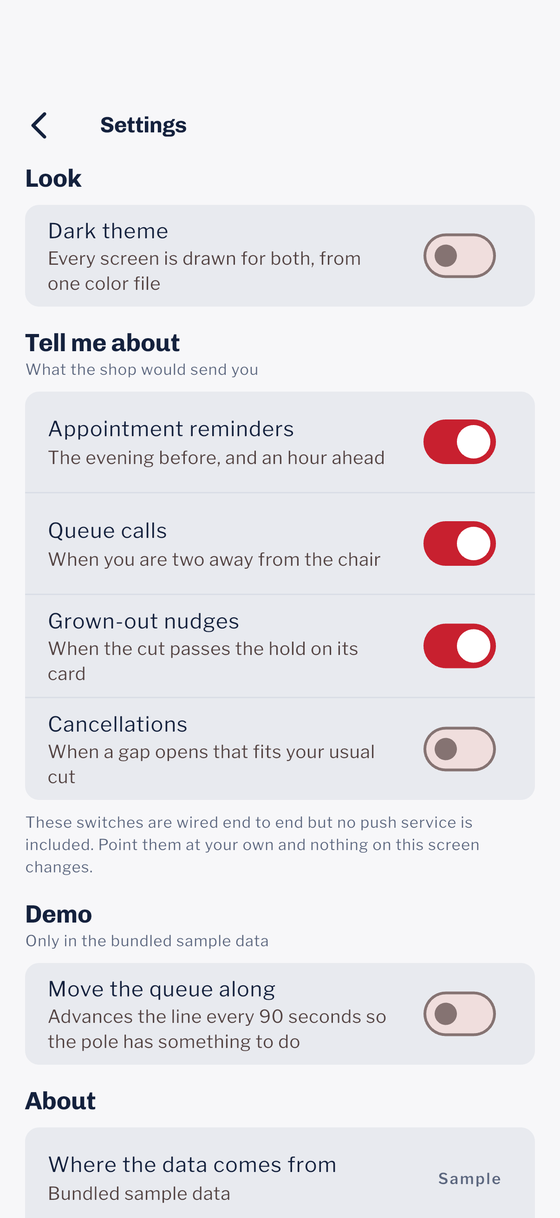
| You | Saved cuts, visits, reviews, the shop, the price list, notifications, settings and about. |
Outside the tabs: splash, three introduction pages, sign-in, create account and the six-digit code screen. Three bottom sheets — the service picker, the cut-card picker and the cancel confirmation — each get their own frame in the walk-through.
4The four signature screens
These are the four that are not in any other booking template, and the reason the project is laid out the way it is. Each one is drawn in code and driven by a plain Dart engine you can read in a sitting (chapter 9).
The time rail
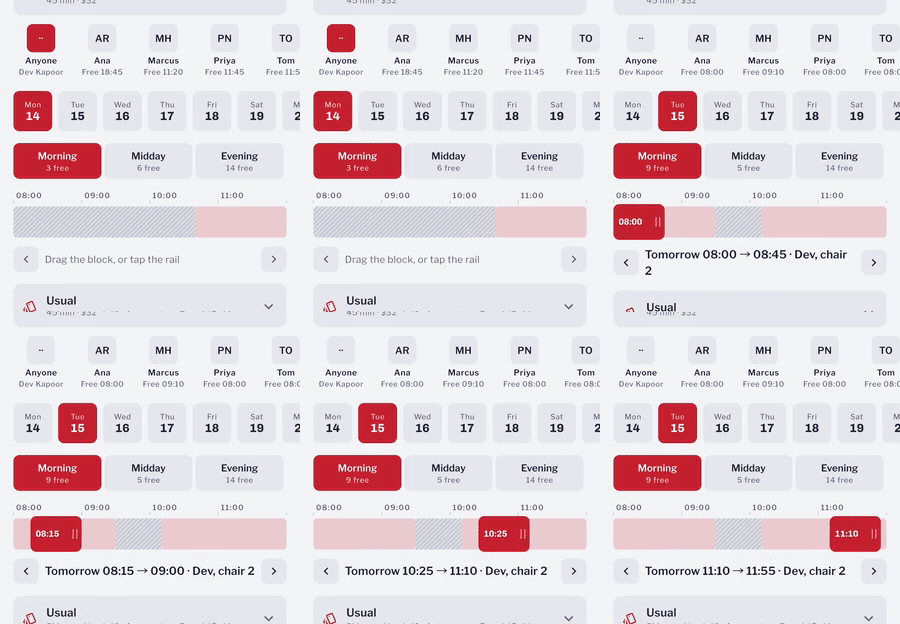
A twelve-hour day squeezed onto a phone gives a forty-five minute cut about twenty pixels, which is too small to grab and too small to read. So the rail shows one four-hour window at a time, and the control that picks the window also tells you how many openings each one has.
Guard dials and the cut card
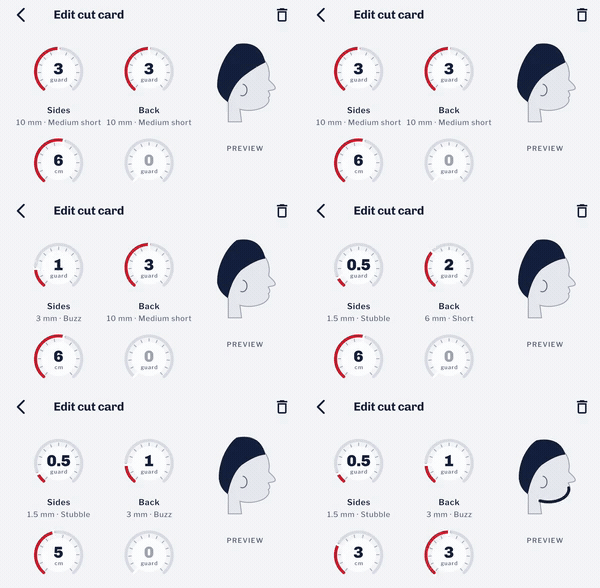
Save the four numbers as a cut card and the barber has them before you sit down. It is also what makes the fourth screen possible: you cannot say when a fade has grown out unless you know it was a fade.
The walk-in queue
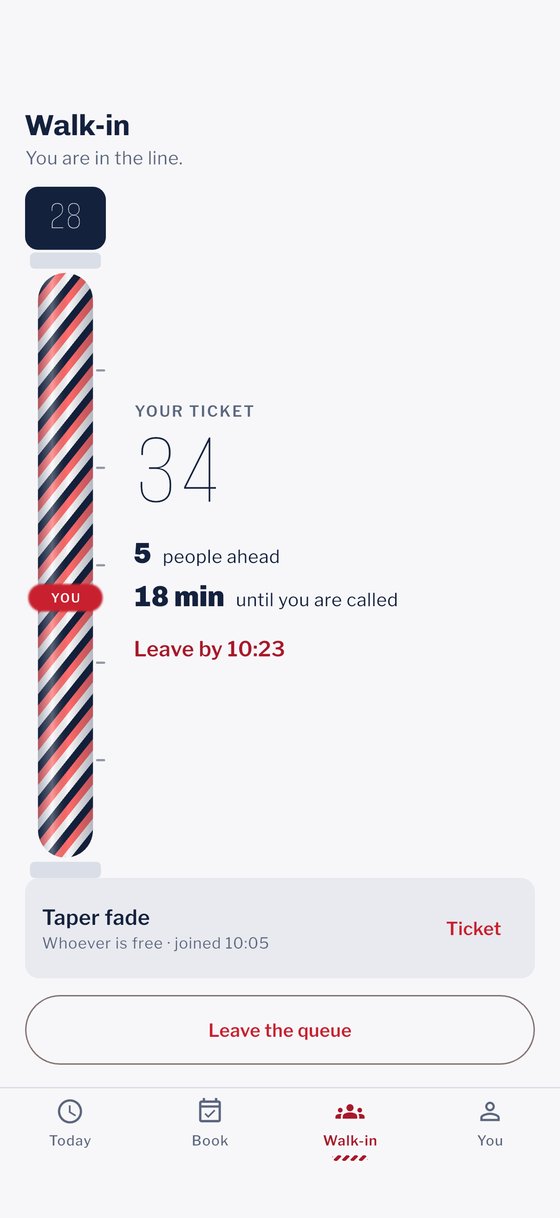
The regrowth strip
5Logo and colors
One file drives every color in the app:
lib/app/core/theme/app_colors.dart. Change the brand values
there and the screens, the launcher icon and the bundled landing page all
follow, because none of them is a picture.
The brand red is three values, not one
One hex cannot do two jobs. White text needs a fill dark enough to sit on; a store thumbnail needs to be bright enough to be seen on a shelf of other thumbnails. Those two ranges do not overlap, so the red is graded:
| Constant | Where it goes | What it has to clear |
|---|---|---|
primary |
Filled controls: buttons, the selected tab, a chosen block. | The label on it reads at 4.5:1. |
primaryBright |
The store tile, the pole's bands, large blocks with no small type. | Bright enough to be seen small. Never put label-sized text on it. |
primaryDeep |
Brand-colored words on the light ground. | Reads as text at 4.5:1. |
primaryDark |
The dark theme's filled grade, with onPrimaryDark on it. |
The same pair, in reverse. |
Pick by asking what sits on top of the color, not by which red looks
nicer: text on it wants primary, text of it wants
primaryDeep, and nothing on it at all wants
primaryBright.
The launcher icon and the store tile
The mark is a barber pole, drawn by
assets/icon/make_icon.py rather than exported from a design
file. If you only want to recolor it, change the three color constants at
the top of that script and run:
python3 assets/icon/make_icon.py
dart run flutter_launcher_icons
That writes the 1024px icon, the Android adaptive layer, the favicon, the
web icons and an 80×80 store tile in one pass. Python needs Pillow
(pip install pillow).
Replacing the icon with your own, step by step
You do not need Python for this, and you do not need to read the
flutter_launcher_icons documentation. The configuration is
already in pubspec.yaml under
flutter_launcher_icons:; you only supply two pictures.
- Export your icon as a PNG, exactly 1024×1024 pixels,
square, with no rounded corners and no transparency. Both stores
round the corners themselves; a pre-rounded or transparent icon shows a
black or white frame. Save it over
assets/icon/app_icon.png. - Export a second PNG, also 1024×1024, this time with a
transparent background, containing only the mark. Keep the mark
inside the central two thirds of the canvas (roughly a 680×680
square in the middle): Android crops adaptive icons to a circle, a
squircle or a rounded square depending on the phone, and anything near the
edge is cut off. Save it over
assets/icon/app_icon_foreground.png. - Open
pubspec.yamland setadaptive_icon_backgroundto the hex color that should sit behind the mark on Android. It is"#C8202F"today. - From the
shearora_ui_kitfolder rundart run flutter_launcher_icons. It writes every size the two platforms want:android/app/src/main/res/mipmap-mdpithroughmipmap-xxxhdpi(48 to 192 px), thedrawable-*/ic_launcher_foreground.pnglayers, and the 21 files inios/Runner/Assets.xcassets/AppIcon.appiconsetincluding the 1024 px App Store icon.remove_alpha_ios: truein the same block strips transparency from the iOS set for you, because App Store Connect rejects an icon with an alpha channel. - Uninstall the app from the device or simulator and install it again. Launchers cache icons; a hot restart will keep showing the old one and make you think the step failed.
- The web icons are separate: replace
web/favicon.png(16×16) andweb/icons/Icon-192.png,Icon-512.png,Icon-maskable-192.png,Icon-maskable-512.pngby hand, or letmake_icon.pyderive them if you kept the script.
6Changing the app name and the bundle ID
Three things carry a name: what shows under the icon, the identifier the stores key off, and the Dart package name. They are set in different places and none of them changes the others.
The name under the icon
| Platform | File | What to change |
|---|---|---|
| Android | android/app/src/main/AndroidManifest.xml |
android:label="Shearora" |
| iOS | ios/Runner/Info.plist |
The string under CFBundleDisplayName |
| Web | web/index.html, web/manifest.json |
<title>, name, short_name |
The bundle identifier
| Platform | File | Current value |
|---|---|---|
| Android | android/app/build.gradle.kts |
com.shearora.shearora_ui_kit, in both
namespace and applicationId |
| iOS | ios/Runner.xcodeproj/project.pbxproj |
com.shearora.shearoraUiKit, in every
PRODUCT_BUNDLE_IDENTIFIER |
Android's is snake case and iOS's is camel case. That is not an
oversight: Apple rejects underscores in a bundle identifier, and these are
exactly what flutter create --org com.shearora produces. If
you change them, keep the same shape.
The Dart package name is shearora_ui_kit, set by the
name: line in pubspec.yaml. Changing it means
changing every package:shearora_ui_kit/... import in the tests,
so it is the one rename worth leaving alone unless you have a reason.
7Fonts
Three typefaces ship inside the app, in assets/fonts/:
| Face | Used for |
|---|---|
| Chivo (700, 900) | Headings, times, prices, guard numbers. |
| Libre Franklin (400, 500, 600) | Body copy, labels, list rows. |
| Alumni Sans Pinstripe (400) | The queue ticket number and the pole's top plate. Two places only. |
Nothing is downloaded at runtime, so the app renders identically offline
and on first launch. All three are under the SIL Open Font License 1.1 and
the full text is in assets/fonts/LICENSES.txt.
Chivo and Libre Franklin are published upstream as variable fonts; the files here are static instances cut at the weights the app uses. That keeps the file names free of the square brackets a variable font carries, which a web build percent-encodes and some marketplaces reject.
Swapping one
- Drop your
.ttfintoassets/fonts/. - Update the
fonts:block inpubspec.yaml. - Change the family name in
lib/app/core/theme/app_text_theme.dart. That is the only file in the project that names a font.
Asking a static font for a weight it does not have is undefined rather than clamped — the renderer synthesises one and it looks wrong in a way that is hard to place. Every heading in the text theme picks one of the two Chivo weights that exist; if your face has different ones, change the weights there too.
8Where the data comes from
Every screen talks to one interface,
lib/app/data/services/repository.dart. Out of the box it is
backed by MockRepository, which answers from a file of written
values. Pass a base URL and ApiRepository takes over with no
change to any screen.
The sample data is written down, not generated
lib/app/data/mock/mock_data.dart holds one shop, six
barbers, fourteen services, twelve bookings, three cut cards, one live queue
ticket and six reviews. Nothing in it reads the system clock or a random
number generator: today is a constant, Monday 14 September
2026 at 10:20.
That is not tidiness. The screenshots, the driver walk-through, the figures in this document and the bundled landing page all have to agree with each other months apart, and they can only do that if "today" is a fixed point. Change that one value and every relative label in the app moves at once, which is also the quickest way to see that none of them is hard-coded prose.
Replacing it with your own API
Rewrite api_repository.dart and nothing else. It is one file
of HTTP calls returning the same models the screens already take. The wire
format it expects is Laravel's default API resource shape —
{"data": [...]} for a collection — because that is what the
included back end emits.
9The four engines
The arithmetic behind the four signature screens lives in
lib/app/core/engines/. Each file is plain Dart: no Flutter
import, no clock of its own, no I/O. They are the most reusable thing in the
project and the easiest to change without breaking a screen.
| File | Answers | Worth knowing |
|---|---|---|
gap_engine.dart |
Where does a block this wide fit in this day? | Start times step from each gap's own beginning, not from the shop's opening. A twenty-minute trim at 09:00 leaves the chair at 09:20, and the next person goes in then. |
guard_scale.dart |
What does a #2 measure, and what is it called? | The ladder is hard-coded because it is uneven — the gap between #2 and #3 is 4mm while #1 to #2 is 3mm. A formula would be tidier and wrong. |
queue_engine.dart |
How long until I am called? | Counts rounds of chairs, not people. Five ahead over four chairs is one round, not five. |
regrowth_engine.dart |
How far past the cut am I? | Works on calendar dates, not durations. A cut at 6pm Monday and a
glance at 9am Tuesday is one day, and
difference().inDays would say zero. |
All four are covered directly in test/, edges included: an
empty day, a full one, a gap that is one minute too small, a queue of zero,
a guard below the bottom of the ladder, a hold of zero days. That is where
to start if you are changing how any of them behaves.
How long a cut holds is a value the shop sets per service, seeded here at fourteen days for a skin fade and twenty-eight for scissor work. The growth rate behind the strip is a population average. The app says "about" everywhere it uses them, and so should yours.
10Errors and empty states
Every list in the app has three states drawn: loading, empty, and something went wrong. They are reachable in the demo — the sample repository answers on a deliberate 260ms delay so the skeleton loaders are visible rather than theoretical.
| State | What the buyer sees |
|---|---|
| Loading | Skeleton blocks in the shape of the content, not a spinner over a blank page. |
| Empty | An icon, a sentence saying what would be here, and usually a button that goes and makes one. |
| Failed | The message the repository threw, in words a person can act on, with a Try again that re-runs the load. |
The shop is loaded by a service registered as permanent,
which means it exists before the sign-in form. Against a real
server there is no token at that moment, so an eager load would be a
screenful of 401s and an error banner on a screen the buyer reached by
signing in successfully. Repository.hasSession is what stops
it; the sample repository returns true for it always, because there is
nothing to sign into. If you swap the repository, keep that property
honest.
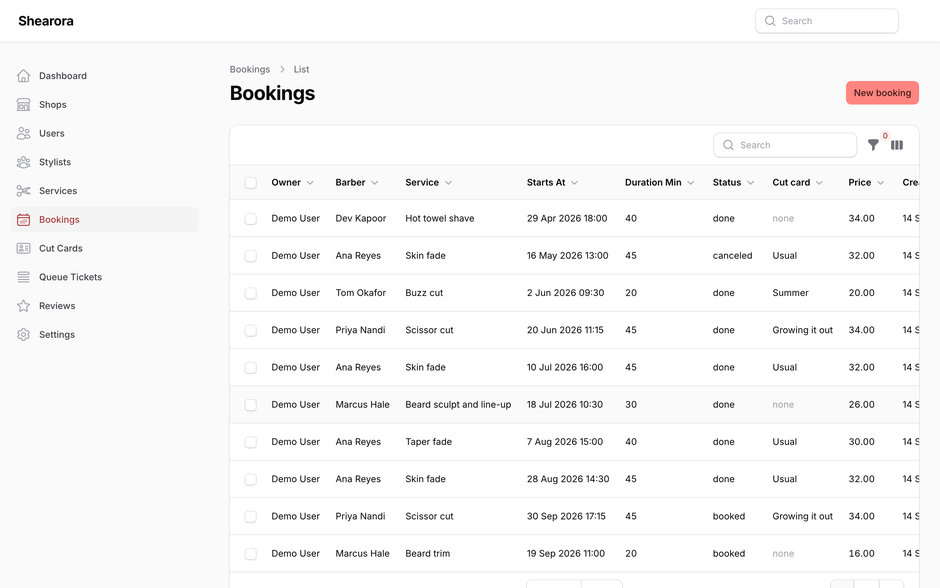
11What the admin does
backend/ is a Laravel 13 application with a Filament 5 admin
panel and a token-authenticated REST API. It manages seven kinds of record:
| Record | Who owns it | Notes |
|---|---|---|
| Shop | The shop | One row. Hours, chairs, address. |
| Stylists | The shop | Names, specialities, chair numbers, ratings. |
| Services | The shop | Price, chair time, and how long the style holds. |
| Bookings | The customer | Scoped to the signed-in user by the API. |
| Cut cards | The customer | The four guard numbers. |
| Queue tickets | The customer | Position and estimate. |
| Reviews | The customer | Rating, and how many days the cut held. |
The first three are catalog rows: the panel edits them and the app reads them. The last four belong to whoever signed in, and the API refuses to hand one person another person's rows.
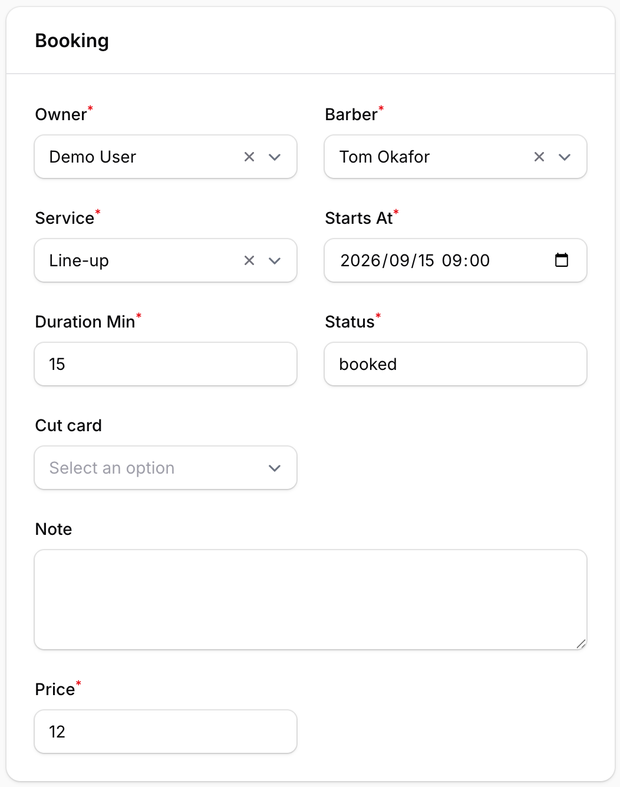
Every screen works with no server at all. The back end is here for when you want real rows behind them, and deploying it is a decision you can put off indefinitely without losing anything from the app.
Credentials the seeder creates
| Who | Password | |
|---|---|---|
| Admin | admin@shearora.test | password |
| App user | demo@shearora.app | demo1234 |
Change both before anything of yours is on the internet. They exist so the panel opens the first time, and for no other reason.
12Putting the back end online
Laravel 13 requires PHP 8.4 or newer. A great many shared hosting packages still default to 8.2, and some cannot be moved off it. Check the PHP version your host offers before you pay, not after: it is the one requirement here that money cannot fix afterwards.
A note on notation for the rest of this chapter: anything written in
<angle brackets> is a value of yours — your domain,
your database name, the folder your host gave you. Nothing in angle brackets
is meant to be typed literally, and no path in these steps is a real
directory on your server until you make it one.
A. With Docker, on your own machine
One command, and it brings its own database:
docker compose up -dThe panel is then at http://localhost:8000/admin. To wipe
everything and start again from an empty database, see chapter 15 — the
command that does it has no confirmation step.
B. With a terminal, on a server
./install.shThe script checks your PHP version, installs the dependencies, writes an
.env, generates an application key, creates the database
tables, seeds the sample shop and tells you the URL. If anything is missing
it stops and says what, rather than half-installing.
C. On shared hosting, without a terminal
- In your host's control panel, set the PHP version for the domain to 8.4 or newer.
- Create a MySQL database and a user, and note the name, user and password.
- Upload the whole
backend/folder over FTP, outside your public folder if the host allows it. - Point the domain's document root at
backend/public. This is the step people miss, and skipping it exposes your.envto the internet. - Copy
.env.exampleto.envusing the file manager, and fill in the three database values from step 2. - Still in the control panel, find Terminal or Cron
Jobs and run
php artisan key:generateonce, thenphp artisan migrate --seedonce. - Open
https://yourdomain/adminand sign in with the admin credentials from chapter 11. Change them immediately.
HTTP or HTTPS: what the phone will and will not connect to
The app talks to the address you give it in chapter 13. Both mobile
platforms treat a plain http:// address as unsafe by default,
and each refuses it in its own way, so read this before the first
“cannot reach the server” message.
| Platform | What happens with http:// | Development-only exception |
|---|---|---|
| Android 9 and newer | The request fails with Cleartext HTTP traffic not permitted.
This applies to your computer's LAN address and to the emulator's
10.0.2.2 alike; it is not a firewall, it is policy. |
Add android:usesCleartextTraffic="true" to the
<application> element in
android/app/src/main/AndroidManifest.xml, or, more
narrowly, a res/xml/network_security_config.xml that
permits cleartext for one <domain> only and is
referenced with android:networkSecurityConfig. This
project ships neither, on purpose: the exception should exist on your
machine while you test, not in the build you publish. |
| iOS | App Transport Security blocks the request; the log says The resource could not be loaded because the App Transport Security policy requires the use of a secure connection. | Add to ios/Runner/Info.plist:
NSAllowsArbitraryLoads permits
it everywhere and has to be justified to App Review; do not reach for
it. |
Production is HTTPS, full stop. Point the app at
https://<your-domain> and have a valid certificate on the
server. On shared hosting that is usually a checkbox called AutoSSL or
Let's Encrypt in the control panel; on your own server, certbot
does it in one command and renews it for you. With HTTPS in place you need
none of the exceptions above, and you should remove any you added while
testing before you build for the stores (chapter 22). Two more things the
phone needs from the server: the certificate must match the host name you
typed (a certificate for www.example.com does not cover
api.example.com), and it must be issued by a public authority
— a self-signed certificate is refused by both platforms exactly like
plain HTTP is.
Day-to-day, without the command line
You do not need a terminal to run this once it is up. Everything below is a control panel job:
| Job | How |
|---|---|
| Back up the data | phpMyAdmin → your database → Export → Quick, SQL. Keep the file somewhere else. |
| Restore a backup | phpMyAdmin → Import → choose the SQL file. It replaces what is there. |
| Add a barber or a service | In the admin panel. Never in phpMyAdmin: the panel validates and the database does not. |
| Clear the sample rows | Admin panel → Settings → the demo section, which runs the same thing chapter 15 describes. |
| Look at a table | phpMyAdmin, or a GUI client: TablePlus, Sequel Ace, DBeaver and HeidiSQL all connect over the same credentials. |
On a corporate network the Docker registry is often blocked outright,
and the error looks like a login problem rather than a firewall. If
docker compose up cannot fetch an image, use route B or C —
nothing in the project needs Docker, it is only the quickest way to try
the panel on your own machine.
13Connecting the app to it
Two ways, and they do exactly the same thing. Use whichever fits how you build.
A. At build time, from the command line
flutter run --dart-define=API_BASE_URL=http://127.0.0.1:8000Use your machine's LAN address rather than 127.0.0.1 when
you are running on a physical phone: the phone's own loopback is not your
computer.
B. By editing one line
If you build from Android Studio or VS Code and would rather not pass
flags, open
lib/app/data/services/app_binding.dart and change this:
static const String apiBaseUrl = String.fromEnvironment('API_BASE_URL');to this:
static const String apiBaseUrl = 'http://127.0.0.1:8000';That is the whole change. Everything downstream — which repository gets built, whether the app waits for a token, what the settings screen reports — reads from that one constant.
What happens then
The sign-in form stops being a formality. It posts to
POST /api/auth/login, keeps the token it gets back for the
session, and every later request carries it. A wrong password comes back as
a line of text under the button rather than as a crash.
It lives in memory for the session, so closing the app means signing in
again. That is deliberate: persisting it means picking a secure-storage
package on your behalf, and you almost certainly already have an opinion
about which one. The seam is one field in ApiRepository.
Authentication headers
Every request the app makes to the back end carries three headers. They
are built in one place, ApiRepository._headers, so changing how
your server expects to be addressed is a change to a single getter.
| Header | Value | When it is sent |
|---|---|---|
Accept |
application/json |
Always. Without it Laravel answers validation errors as an HTML error page, and the app reports a parse failure instead of the message the server actually wrote. |
Content-Type |
application/json |
Always. The bodies are jsonEncoded. |
Authorization |
Bearer <token> |
Only once a token exists. Before sign-in the header is omitted
entirely rather than sent empty, because Bearer with
nothing after it is a malformed credential and some gateways reject
the request before Laravel ever sees it. |
The token comes from POST /api/auth/login, which Sanctum
issues as a personal access token. A build can also be handed one directly
with --dart-define=API_TOKEN=…, which is useful for a demo
device that should open already signed in.
When the server answers 401 the repository raises a
RepositoryException carrying that status and the message
“The session has expired. Sign in again.” That is the one
status worth special-casing: every other 4xx and
5xx becomes a message naming the status and the path, so a
misconfigured route reads as a misconfigured route rather than as an
empty screen. See chapter 10 for where those messages surface.
If your own back end authenticates differently — an API key header, a cookie session, OAuth — rewrite the getter and nothing above it changes. No screen, controller or service in this app constructs a header.
14Landing page
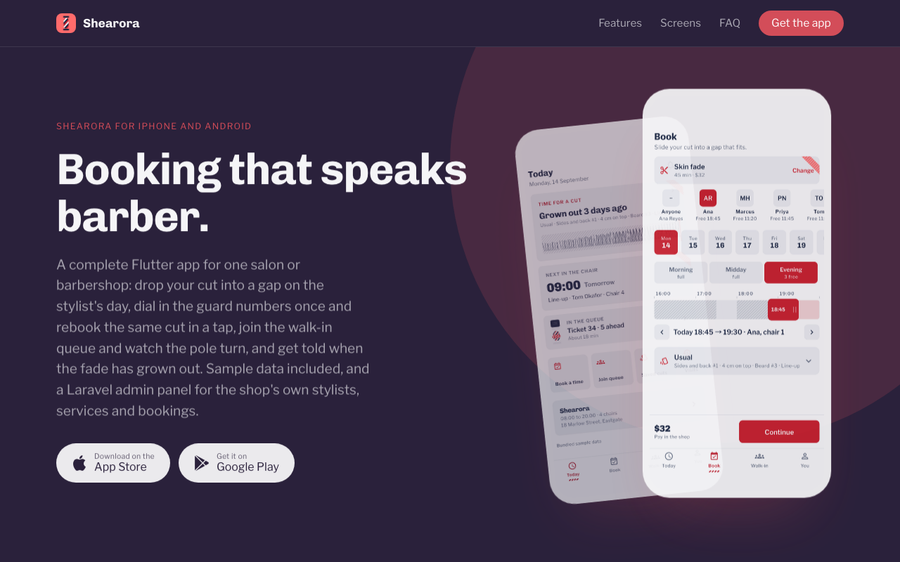
landing/. No framework, no build
step, no external request — the fonts and the screenshots are in the
folder next to it.It is a product website for your app, not for this item. Put it
on any static host, or drop it in the back end's public/
folder and it serves itself.
Three places are marked <!-- replace --> in the HTML:
the two store links, the contact address and the privacy and terms links.
Everything else is ordinary copy you can rewrite. The colors and the two
typefaces come from the app, so re-skinning the app re-skins this too — the
page is regenerated by
tools/make_landing.py in the workspace this was built in, but
you do not need that: it is a single HTML file you can edit directly.
15Commands
Everything you are likely to type, in one place, with what it does to your data.
The app
| Command | What it does |
|---|---|
flutter pub get |
Fetches the three packages. Run it after unzipping and after any
change to pubspec.yaml. |
flutter run |
Builds and launches on the selected device, with sample data. |
flutter analyze |
Static analysis. Should print No issues found. |
flutter test |
The 138 widget and unit tests. Takes about ten seconds. |
flutter build apk --release |
An Android release build. |
flutter build ios --release |
An iOS release build. Needs a signing identity in Xcode. |
flutter clean |
Deletes build output. Harmless, and the first thing to try when a build fails for no visible reason. |
The back end
| Command | What it does |
|---|---|
composer install |
Fetches the PHP dependencies. |
php artisan key:generate |
Writes the application key into .env. Once, at
install. |
php artisan migrate |
Creates any tables that do not exist yet. Leaves existing rows alone. |
php artisan migrate --seed |
The same, then fills the sample shop in. |
php artisan serve |
A development server on port 8000. Not for production. |
composer test |
The 50 backend tests. |
php artisan demo:clear |
Deletes every row the seeder created and nothing else. Rows you added yourself survive. This is the one to use before going live. |
php artisan migrate:fresh --seed drops every table
in the database and rebuilds it. Everything you have entered is
gone: the rows you added, the accounts you made, the passwords you
changed. There is no confirmation prompt and no undo. It is the right
command on a laptop and the wrong one on anything with real data on it.
docker compose down -v does the same by a different route:
the -v deletes the volume the database lives in. Without
-v the data survives a restart; with it, nothing does.
Regenerating what is in this folder
| Command | What it does |
|---|---|
flutter drive --driver=test_driver/integration_test.dart --target=integration_test/screenshots_test.dart |
Walks all 27 screens and writes fresh PNGs. Needs a booted simulator or emulator. |
python3 assets/icon/make_icon.py |
Redraws the icon set and the store tile from the color constants at the top of that file. |
16Tests and quality
138 Flutter tests 50 backend tests 157 backend assertions 0 analyzer issues
The Flutter tests are in test/ and fall into four groups:
- The engines. Every rule and every edge, including the ones that only bite once: a gap one minute too small, a tie between two legal start times, a queue of zero, a hold of zero days.
- The painters. Each drawn widget is built the way a
screen builds it and then measured. A
CustomPaintwith no child collapses to zero on whichever axis its parent leaves loose, and a screen that renders nothing passes the analyzer, the tests and the driver walk-through without complaint. These are the check that catches it. - The booking screen. Driven through its controller, then inspected: is the chip for the chosen day actually the filled one?
- The app itself. It boots, walks its own introduction, signs in with the credentials it arrives holding, and lands on a populated home screen.
integration_test/ holds three more: the screenshot
walk-through, and the two recordings that produced the animations in chapter
4. They are driven through controllers rather than synthetic taps, because a
synthetic pointer paints a test cursor into the recording.
17Troubleshooting
The app
| What you see | What to do |
|---|---|
| Gradle fails mentioning a Java version | Android builds want JDK 17. Android Studio ships
one: Settings → Build Tools → Gradle → Gradle JDK, pick the
embedded 17. On the command line, set JAVA_HOME to it. |
pod install fails on an Apple Silicon Mac |
Run sudo gem install cocoapods, then from
ios/ run pod repo update and
pod install. A Rosetta terminal is no longer
needed. |
| The editor says the Dart SDK is not found | The Flutter plugin is installed but has no SDK path yet. In VS Code, run Flutter: Change SDK; in Android Studio, Settings → Languages & Frameworks → Flutter. |
A build fails right after you changed pubspec.yaml |
flutter clean, then flutter pub get, then
run again. |
| Fonts look wrong on the web | Flutter's CanvasKit renderer fetches its own fallback face when the engine boots. That is the engine, not this app, and it happens for every Flutter web build. The three bundled faces still render from the package. |
The back end
| What you see | What to do |
|---|---|
| Composer refuses to install, mentioning PHP | You are on PHP 8.3 or older. See the note at the top of chapter 12. |
| A blank white page at your domain | The document root is pointing at backend/ instead of
backend/public. Step 4 of route C. |
A blank white page at your domain, and the document root is
already backend/public |
Same symptom, different cause: storage/ or
bootstrap/cache/ is not writable by the web server, so
Laravel cannot write its logs or compiled files and gives up before it
can show an error page. In the file manager, set permissions on
storage (including everything inside it),
bootstrap/cache and public/uploads to
775; from a terminal that is
chmod -R 775 storage bootstrap/cache public/uploads.
Then open storage/logs/laravel.log — once the
folder is writable the real error, if any, is written there. |
| The panel loads but every page is 500 | No application key. Run php artisan key:generate. |
| The app gets 401 on every request | It is signed out. The token lives for the session only, so a restart means signing in again — see the note in chapter 13. |
| The app says it cannot reach the server | On a physical phone, 127.0.0.1 is the phone. Use your
computer's address on the local network. |
18Glossary
| Term | What it means here |
|---|---|
| Guard | The plastic comb on a set of clippers. A #2 leaves 6mm. The numbers are not evenly spaced; see chapter 9. |
| Cut card | Four saved guard numbers plus a line-up flag, so nobody has to describe the cut again. |
| Line-up | Squaring off the front hairline. Drawn as the short red rule on the head preview. |
| Hold | How many days a style keeps looking like itself. A property of the service, adjustable per cut card. |
| The rail | A stylist's day drawn at true width, with your booking as a block you slide into it. |
| Window | The four-hour slice of the day the rail is showing: morning, midday or evening. |
| Walk-in | Turning up without a booking and taking a ticket. Runs alongside the book, not instead of it. |
| GetX binding | The object that registers a screen's controller when its route is pushed and disposes it when the route pops. |
| Repository | The single interface between the screens and the data. Sample file or HTTP, chosen by one build flag. |
| Sanctum token | The bearer token the back end issues at sign-in and expects on every later request. |
| Filament | The admin panel framework the back end uses. The tables and forms in chapter 11 are Filament resources. |
| Seeder | The class that writes the sample shop into a fresh database. Everything it writes is flagged so it can be removed again. |
19Third-party code and licenses
Flutter packages
| Package | License | Used for |
|---|---|---|
get | MIT | Routing, bindings and state. |
http | BSD-3-Clause | The API repository only, and only when a base URL is set. |
cupertino_icons | MIT | The iOS-style icon set. |
Three, deliberately. Fewer dependencies means a wider range of Flutter versions this will compile against, which matters more to you than any one convenience package would.
Typefaces
Chivo, Libre Franklin and Alumni Sans Pinstripe, all SIL Open Font
License 1.1. Full text in assets/fonts/LICENSES.txt.
Back end
Laravel (MIT), Filament (MIT), Laravel Sanctum (MIT), Pest (MIT). Their
own license files are under backend/vendor/ once you install.
Images
There are none. assets/ contains fonts and the generated
icon, and nothing else — every card, pole, dial, rail and head in the app is
drawn in code. Nothing in this item is an AI-generated image, a stock photo
or a licensed illustration, because there are no images to be any of
those.
20What is not included
Stated plainly so you can decide before you build on it.
- No payment processing. Prices are shown and bookings are made; money changes hands in the shop. There is no card form, no deposit and no tip flow anywhere in the project.
- No push notifications. The reminder switches in settings are wired end to end but there is no push service behind them. Connecting one is yours.
- No SMS. The six-digit code screen accepts any six digits and sends no message.
- No maps or location. A single shop has one address, and it is text.
- No staff-facing app. The admin panel is the shop's side; there is no second Flutter application for barbers.
- No design source files. The interface is defined in Dart, not in Figma or Sketch. The color file and the text theme are the design system.
- No multi-shop mode. Adding one means changing the data model and removing the queue, which is most of the project.
Connecting this to a live back end, a push service or any other third-party platform will involve those services, which will incur their own separate costs and are not part of this item. Hosting for the included Laravel application is yours to arrange.
21Support and license
Questions about getting it running, re-skinning it, or connecting the back end are answered through the item's comments on the marketplace page. Item support covers this template: the code in the download and the instructions in this file.
It does not cover your hosting account, your marketplace developer account, or a third-party service you connect the app to. Those have their own support, and they will know their own product better than anyone here.
License
Whichever license you bought on the marketplace. In short: a Regular License covers one end product that is free for its users; an Extended License covers one end product that users are charged for. One license per end product either way, and the marketplace's own license page is the authority, not this paragraph.
22Building for release and the stores
Everything up to here runs from a terminal or an IDE. Putting the app in buyers' hands means a signed release build and two store consoles, and both have requirements that are easier to meet before you start than to discover from a rejection. This chapter is the order of operations; the bundle identifier itself is chapter 6.
The release build type is signed with the debug key
(android/app/build.gradle.kts lines 37–43, marked
TODO), there is no android/key.properties, and
Xcode has no team selected. That is deliberate: a signing key is
yours and must never be in a zip that other people also download.
Both stores will refuse the build until you do the steps below.
Android: the upload key
- Create a keystore once, and keep it forever — losing it means
you can never update the app under the same listing:
keytool -genkey -v -keystore ~/upload-keystore.jks -keyalg RSA -keysize 2048 \ -validity 10000 -alias upload - Create
android/key.properties(it is already in.gitignore; keep it out of source control):storePassword=<the password you just typed> keyPassword=<the same, unless you chose another> keyAlias=upload storeFile=<absolute path>/upload-keystore.jks - In
android/app/build.gradle.kts, aboveandroid {, load the file:
then replace theimport java.util.Properties import java.io.FileInputStream val keystoreProperties = Properties() val keystorePropertiesFile = rootProject.file("key.properties") if (keystorePropertiesFile.exists()) { keystoreProperties.load(FileInputStream(keystorePropertiesFile)) }buildTypesblock at lines 37–43 with:signingConfigs { create("release") { keyAlias = keystoreProperties["keyAlias"] as String keyPassword = keystoreProperties["keyPassword"] as String storeFile = keystoreProperties["storeFile"]?.let { file(it) } storePassword = keystoreProperties["storePassword"] as String } } buildTypes { release { signingConfig = signingConfigs.getByName("release") } } - Check
applicationIdon line 28 is the identifier you settled on in chapter 6; it cannot change after the first upload. - Build the bundle Play wants:
The file isflutter build appbundle --releasebuild/app/outputs/bundle/release/app-release.aab. (flutter build apk --releasegives an installable.apkunderbuild/app/outputs/flutter-apk/for sideloading onto a test phone; Play itself only takes the.aab.)
Play Console. Create the app, accept Play App Signing
(Google keeps the final signing key; yours is the upload key), then
Testing → Internal testing → Create release and drop the
.aab in. Before production you will be asked for a privacy
policy URL, the Data safety form, content rating, and store listing assets:
a 512×512 icon, a 1024×500 feature graphic and phone
screenshots. The screenshots/ folder that came with this
download has 1920×1080 material to crop from. targetSdk is
pinned to 36 in the Gradle file, which meets Play's current requirement.
If the app will talk to your back end, keep the
INTERNET permission that is declared in
android/app/src/main/AndroidManifest.xml; the debug build adds
it silently, a release build does not, and without it every request fails
with a socket error.
iOS: signing in Xcode, click by click
You need a Mac, Xcode, and a paid Apple Developer Program membership (the free tier can run on your own device but cannot upload to the store).
- From the
shearora_ui_kitfolder runopen ios/Runner.xcworkspace. Open the workspace, notRunner.xcodeproj; the project alone does not see the CocoaPods dependencies. - In the left-hand Project navigator click the blue Runner icon at the very top of the tree.
- In the editor that opens, under TARGETS (not
PROJECT) select Runner. There is a second target,
RunnerTests; leave it. - Click the Signing & Capabilities tab along the top of that editor (the tabs read General · Signing & Capabilities · Resource Tags · Info · Build Settings …).
- Tick Automatically manage signing and choose your Team from the drop-down. Xcode creates the signing certificate and the provisioning profile for you; if the Team list is empty, add your Apple ID under Xcode → Settings → Accounts first.
- In the same panel check Bundle Identifier. It shows
com.shearora.shearoraUiKitas shipped; type the one you chose in chapter 6. It must be registered to your team and unique across the App Store. - A red message under the Team field means the identifier is taken or
the profile could not be made; the message says which. Fix it here before
building —
flutter build ipaonly repeats Xcode's error.
Then build the archive:
flutter build ipa --releaseThe result is build/ios/ipa/<app name>.ipa, and the
archive Xcode made along the way is
build/ios/archive/Runner.xcarchive. Upload either: drag the
.ipa into the free Transporter app from the Mac
App Store, or double-click the .xcarchive to open it in Xcode's
Organizer and click Distribute App → App Store Connect.
Info.plist: what App Review looks for
Apple rejects a build that uses a protected resource without a
NS…UsageDescription string explaining why.
This app uses none of them — no camera, no photo
library, no location, no contacts, no microphone — so
ios/Runner/Info.plist ships with no usage-description keys and
needs none. Add the matching key the day you add a feature that does
(for example NSCameraUsageDescription when you let customers
photograph their cut). Two things in the plist you may want to touch:
CFBundleDisplayName (Shearora, the name under the
icon — chapter 6) and UISupportedInterfaceOrientations,
which allows landscape on iPhone; remove the two landscape entries if you
want the app locked to portrait like most booking apps. If you added an
NSAppTransportSecurity exception while testing against a plain
HTTP server (chapter 12), take it out before this build.
App Store Connect
Create the app record with the same bundle identifier, then fill in what
Review asks of every app: screenshots for a 6.7″ and a 6.5″ iPhone
(the 1290×2796 and 1284×2778 sizes; the simulator screenshots in
screenshots/ are 1179×2556 and re-export at those sizes),
a privacy policy URL, and the App Privacy questionnaire. Answer
that questionnaire from what the build does: on sample data it collects
nothing; connected to your back end it collects an email address and a name
for account purposes, and bookings linked to that account. If sign-up is
open on your server, Review will create an account to test with; give them
the demo credentials from chapter 12 in the review notes so they do not
have to.
Versioning both builds
Both stores read version: in pubspec.yaml
(1.0.0+1 as shipped). The part before + is what
users see; the part after is the build number, and each upload to either
store needs one higher than the last. Change it there, not in Xcode or
Gradle, so the two platforms stay in step.
23API reference
Everything the back end exposes to the app, in one place. Routes are
declared in backend/routes/api.php (the four account routes) and
backend/routes/companion.php (the seven record types, as
apiResource groups). php artisan route:list prints
the same list from the code, so if this table and the code ever disagree,
the code wins.
Conventions that apply to every route
- Base path is
/api/under the server root; the app appends it itself (chapter 13), so the address you configure ends at the host. - Requests and responses are JSON. Send
Accept: application/jsonandContent-Type: application/json; a middleware forces theAcceptheader anyway so validation errors come back as JSON rather than a redirect. - “Bearer” in the table means the route sits behind
auth:sanctum: sendAuthorization: Bearer <token>with the token thatloginorregisterreturned. Without it the answer is401 {"message":"Unauthenticated."}. - Single records come wrapped as
{"data": {…}}; lists as{"data": […], "links": {…}, "meta": {…}}with Laravel's standard pagination fields (current_page,last_page,per_page,total). - Validation failures are
422with{"message": "…", "errors": {"field": ["reason"]}}. - Bookings, cut cards, queue tickets and reviews are owned: a
user sees and edits only rows with their own
user_id; an admin token sees all of them. A row that is not yours answers 404.
Every endpoint
| Method | Path | Auth | Request body | Response |
|---|---|---|---|---|
POST | api/auth/register | none | name string ≤255 · email unique · password ≥8 | 201 {token, user}; 403 when the admin has turned sign-ups off |
POST | api/auth/login | none | email · password | 200 {token, user}; 422 Invalid credentials. |
GET | api/auth/me | Bearer | — | 200 {user} |
POST | api/auth/logout | Bearer | — | 204, the token is deleted |
GET | api/shops · api/shops/{id} | Bearer | — | {data:[Shop]} paginated 100 · {data: Shop}. Read-only: shops, stylists and services are edited in the admin panel |
GET | api/stylists · api/stylists/{id} | Bearer | — | {data:[Stylist]} · {data: Stylist} |
GET | api/services · api/services/{id} | Bearer | — | {data:[Service]} · {data: Service} |
GET | api/bookings | Bearer | — | {data:[Booking], links, meta}, newest first, 50 per page, only the caller's own rows |
POST | api/bookings | Bearer | stylist_id int · service_id int · starts_at date · duration_min int · status string · price number · cut_card_id int? · note string? | 201 {data: Booking}; the owner is set from the token, never from the body |
GET | api/bookings/{id} | Bearer | — | 200 {data: Booking}; 404 if it belongs to someone else (never 403, so ids cannot be enumerated) |
PUT · PATCH | api/bookings/{id} | Bearer | any subset of the POST fields | 200 {data: Booking} |
DELETE | api/bookings/{id} | Bearer | — | 204 |
GET · POST | api/cut-cards | Bearer | name · sides_guard · back_guard · top_cm numbers · beard_guard number? · lineup bool · hold_days int · notes string? | list / 201 {data: CutCard} |
GET · PUT · PATCH · DELETE | api/cut-cards/{id} | Bearer | as above, any subset | {data: CutCard} / 204 |
GET · POST | api/queue-tickets | Bearer | number int · joined_at date · service_id int · stylist_id int? · status string · position · eta_min · joined_position ints | list / 201 {data: QueueTicket} |
GET · PUT · PATCH · DELETE | api/queue-tickets/{id} | Bearer | as above, any subset | {data: QueueTicket} / 204 |
GET · POST | api/reviews | Bearer | booking_id int · stylist_id int · rating int · held_days int? · body string? · left_at date | list / 201 {data: Review} |
GET · PUT · PATCH · DELETE | api/reviews/{id} | Bearer | as above, any subset | {data: Review} / 204 |
GET | up | none | — | 200 when the application boots: the health check to point uptime monitors at |
The three you will try first
These use the demo account the seeder creates, so they work against a fresh install with no setup beyond chapter 12. Replace the host as needed.
1. Sign in
curl -s -X POST http://127.0.0.1:8000/api/auth/login \
  -H "Accept: application/json" -H "Content-Type: application/json" \
  -d '{"email":"demo@shearora.app","password":"demo1234"}'
{
"token": "3|k9Qm2vX8pR5tL1wN7yB4cD6fG0hJ2sA5eU8iO3zT",
"user": { "id": 2, "name": "Demo User", "email": "demo@shearora.app", "role": "user" }
}Keep the token value; the next two calls send it. A wrong
password answers 422 with
{"message":"Invalid credentials.","errors":{"email":["Invalid credentials."]}}.
2. List the caller's bookings
curl -s http://127.0.0.1:8000/api/bookings \
  -H "Accept: application/json" \
  -H "Authorization: Bearer 3|k9Qm2vX8pR5tL1wN7yB4cD6fG0hJ2sA5eU8iO3zT"
{
"data": [
{
"id": 12, "stylist_id": 4, "service_id": 10,
"starts_at": "2026-09-15T09:00:00+00:00", "duration_min": 15,
"status": "booked", "cut_card_id": null, "note": "", "price": 12.0,
"created_at": "2026-09-14T10:20:00+00:00", "updated_at": "2026-09-14T10:20:00+00:00"
}
],
"links": { "first": "…/api/bookings?page=1", "last": "…/api/bookings?page=1", "prev": null, "next": null },
"meta": { "current_page": 1, "last_page": 1, "per_page": 50, "total": 12 }
}3. Create a booking
curl -s -X POST http://127.0.0.1:8000/api/bookings \
  -H "Accept: application/json" -H "Content-Type: application/json" \
  -H "Authorization: Bearer 3|k9Qm2vX8pR5tL1wN7yB4cD6fG0hJ2sA5eU8iO3zT" \
  -d '{"stylist_id":4,"service_id":10,"starts_at":"2026-09-16T11:30:00+00:00",
       "duration_min":30,"status":"booked","price":28.0,"note":"Same as last time"}'
{
"data": {
"id": 13, "stylist_id": 4, "service_id": 10,
"starts_at": "2026-09-16T11:30:00+00:00", "duration_min": 30,
"status": "booked", "cut_card_id": null, "note": "Same as last time", "price": 28.0,
"created_at": "…", "updated_at": "…"
}
}Leave out service_id and the same call answers
422 naming the field. Note that user_id is not in
the body and is ignored if you send it: the owner is whoever the token
belongs to.
lib/app/data/services/api_repository.dart is the only file
that speaks to these routes. Its _headers getter builds the
three headers above, _uri() prepends /api/, and
each method maps one to one onto a row of the table, so it doubles as a
worked example in Dart.
24Environment variables
backend/.env is the one file the back end reads its
configuration from, and backend/.env.example is the template
install.sh copies it from. Every key in that template is listed
here with its type, the value it ships with and what it controls, so you can
check a shared-hosting install line by line instead of guessing. Values
live in the config/*.php files, which read them with
env(); nothing in app/ reads the environment
directly.
If you only do one thing in this file, do the first group and set
APP_DEBUG=false.
| Group | Key | Type | Ships as | What it controls |
|---|---|---|---|---|
| Set these | APP_NAME | string | Shearora | The name shown in the admin panel's browser tab and in mail; also prefixes cache keys. |
| Set these | APP_ENV | string | local | local while you test, production on a live server. Turns some framework safety checks on. |
| Set these | APP_KEY | string | empty | The encryption key. php artisan key:generate fills it; every page is a 500 until it does. Never share or reuse it. |
| Set these | APP_DEBUG | bool | true | Show stack traces in the browser. Set to false on a live server: a debug page prints your database password. |
| Set these | APP_URL | string | http://localhost | The public address of the back end, used to build absolute links. Match it to what the app is pointed at. |
| Set these | DB_CONNECTION | string | sqlite | sqlite needs nothing else and is fine for testing; on hosting use mysql and fill the five DB_ lines below. |
| Set these | DB_HOST | string | 127.0.0.1 (commented out) | Database server. On shared hosting usually 127.0.0.1 or localhost; in the Docker file it is db. |
| Set these | DB_PORT | int | 3306 (commented out) | MySQL's port. Leave it unless your host says otherwise. |
| Set these | DB_DATABASE | string | laravel (commented out) | The database you created in the control panel. For sqlite it is a file path and the default database/database.sqlite is used. |
| Set these | DB_USERNAME | string | root (commented out) | The database user. |
| Set these | DB_PASSWORD | string | empty (commented out) | Its password. |
| Leave as they are | APP_LOCALE · APP_FALLBACK_LOCALE · APP_FAKER_LOCALE | string | en · en · en_US | Interface and test-data language. |
| Leave as they are | APP_MAINTENANCE_DRIVER | string | file | How php artisan down records maintenance mode. |
| Leave as they are | BCRYPT_ROUNDS | int | 12 | Password hashing cost. Higher is slower and safer; 12 is the framework default. |
| Leave as they are | LOG_CHANNEL · LOG_STACK · LOG_LEVEL · LOG_DEPRECATIONS_CHANNEL | string | stack · single · debug · null | Where and how much is logged. Logs land in storage/logs/laravel.log; set LOG_LEVEL=error on a busy server. |
| Leave as they are | SESSION_DRIVER · SESSION_LIFETIME · SESSION_ENCRYPT · SESSION_PATH · SESSION_DOMAIN | string · int · bool · string · string | database · 120 · false · / · null | The admin panel's browser session. database means the sessions table the migrations create; 120 is minutes until an idle admin is signed out. The app does not use sessions at all (tokens instead). |
| Leave as they are | CACHE_STORE · QUEUE_CONNECTION · FILESYSTEM_DISK | string | database · database · local | Cache, job queue and file storage all default to the database or local disk so the install needs no Redis and no S3. |
| Leave as they are | BROADCAST_CONNECTION | string | log | Event broadcasting. Not used by this item. |
| Leave as they are | MAIL_MAILER · MAIL_HOST · MAIL_PORT · MAIL_USERNAME · MAIL_PASSWORD · MAIL_SCHEME · MAIL_FROM_ADDRESS · MAIL_FROM_NAME | string · string · int · string · string · string · string · string | log · 127.0.0.1 · 2525 · null · null · null · hello@example.com · "${{APP_NAME}}" | Outgoing mail. With log nothing is sent and each message is written to the log file, which is right for this item: it sends no mail of its own. Fill these only if you add password resets or notifications. |
| Not used by this item | MEMCACHED_HOST · REDIS_CLIENT · REDIS_HOST · REDIS_PASSWORD · REDIS_PORT | string · string · string · string · int | 127.0.0.1 · phpredis · 127.0.0.1 · null · 6379 | Present because the framework's example file lists them. Harmless while CACHE_STORE and SESSION_DRIVER stay on database. |
| Not used by this item | AWS_ACCESS_KEY_ID · AWS_SECRET_ACCESS_KEY · AWS_DEFAULT_REGION · AWS_BUCKET · AWS_USE_PATH_STYLE_ENDPOINT | string · string · string · string · bool | empty · empty · us-east-1 · empty · false | Only read if you switch FILESYSTEM_DISK to s3. |
| Not used by this item | VITE_APP_NAME · PHP_CLI_SERVER_WORKERS · APP_MAINTENANCE_STORE | string · int · string | "${{APP_NAME}}" · 4 · database (the last two commented out) | Front-end build variable (there is no front-end build here), artisan serve worker count, maintenance-mode store. |
Read but not listed in .env.example | SANCTUM_STATEFUL_DOMAINS · SANCTUM_TOKEN_PREFIX | string | framework defaults · empty | Only matter for cookie-based browser clients. The app uses bearer tokens, so leave both unset unless you build a web SPA against the same API. |
Read but not listed in .env.example | AUTH_GUARD · AUTH_PASSWORD_BROKER · AUTH_MODEL · AUTH_PASSWORD_RESET_TOKEN_TABLE · AUTH_PASSWORD_TIMEOUT | string | framework defaults | Authentication plumbing. Leave unset. |
Two more files carry environment values for specific routes:
backend/.env.docker is the copy Docker Compose uses
(DB_CONNECTION=mysql, DB_HOST=db,
DB_DATABASE=shearora, DB_USERNAME=root,
DB_PASSWORD=root, APP_URL=http://localhost:8000) and
backend/docker-compose.yml creates that MySQL database with the
same name and root password. Neither is read on a real server.
After changing .env on a server where you have run
php artisan config:cache, run it again: cached configuration
does not notice edits to the file.
25Upgrading to a newer release
A newer release of this item arrives as a fresh zip with the same three folders. Nothing in it knows about your install, so the upgrade is a copy-over with a short list of files you keep. This chapter is that list, plus the order that keeps your data.
Before anything else
- Back up the database. On shared hosting that is phpMyAdmin →
Export; with Docker it is
docker compose exec db mysqldump -uroot
    -proot shearora > backup.sql
; with sqlite it is copyingbackend/database/database.sqlite. - Copy
backend/.envandbackend/public/uploads/somewhere safe. Those two are yours and are not in any zip. - If you have not already, put both projects under version control
(
git init, commit) before editing anything. Then a future upgrade isgit diffrather than memory.
Which files are yours and which are the release's
| Folder | Keep yours (do not overwrite) | Replace from the new zip |
|---|---|---|
backend/ |
.env · public/uploads/ · the
app_settings row and every other table (they are data, not
files) · app/Providers/Filament/AdminPanelProvider.php if
you changed the brand name or color there · anything you added under
resources/views/ |
app/ · routes/ · database/migrations/
· database/seeders/ · config/ ·
composer.json · composer.lock · public/index.php
· install.sh · docs/. If you edited
AdminPanelProvider.php, take the new file and re-apply your
two lines rather than keeping the old file: that file also carries
panel wiring that a release may change. |
shearora_ui_kit/ |
The color, text-theme and font files chapters 5 and 7 told you to
edit · assets/icon/ and the generated launcher icons ·
assets/fonts/ if you swapped typefaces ·
android/key.properties and your keystore (chapter 22) ·
android/app/build.gradle.kts signing block and
applicationId · ios/Runner.xcodeproj signing
and bundle identifier · lib/app/data/services/app_binding.dart
if you hard-coded the server address (chapter 13) |
Everything else under lib/, test/,
integration_test/, documentation/, and
pubspec.yaml (then re-apply any dependency you added). |
landing/ |
The whole folder, if you edited the copy. It is a static page with no dependency on the other two. | Nothing, unless the changelog says the page changed and you want the new version. |
Doing the back end
- Unzip the release next to your install, not over it.
- Copy the “replace” folders from the new
backend/over yours. Do not copy.env.exampleover.env. - Run
composer install --no-dev --optimize-autoloader(or./install.sh, which does this and the next step for you). - Run
php artisan migrate --force. This is safe on a live database. Every migration in this item only creates tables that do not exist yet (Schema::create); none drops or renames a column, and that rule holds for future releases too. Existing rows are untouched. Do not runmigrate:freshon a server — it drops every table first, including your bookings; it exists for the Docker demo only. - Do not run
db:seedagain. The seeder refuses to run twice anyway (it stops when the demo admin already exists), but there is nothing in it you want on a live install. php artisan config:cache && php artisan route:cache && php artisan view:cache, then open/adminand sign in. If a page is blank, clear the caches once withphp artisan optimize:clearand cache again.
Doing the app
- Copy the “replace” files over your
shearora_ui_kit/. With git,git statusnow shows exactly what changed; without it, keep the old folder until the new one builds. - Re-apply your own edits from the “keep” column where a
replaced file needed them (typically only
pubspec.yamlif you added packages, andapp_binding.dart). - Raise
version:inpubspec.yaml(both the name and the build number after the+; stores refuse a build number they have already seen), thenflutter pub get,flutter analyze,flutter test, and build as in chapter 22.
The API in chapter 23 is versioned by behaviour, not by URL: a release that adds a field adds it as optional, so an older app keeps working against a newer server and a newer app tolerates a missing field from an older one. Upgrade the server first, then ship the app when the stores approve it; the changelog says if a release ever needs both at once.
26What is left for you to wire up
Chapter 20 says what is not in the box. This chapter is the other half of that promise: for each thing that is deliberately left open, where the seam is, what is already there, and what you bring. None of these is a hidden dependency — the app runs, ships and passes its tests exactly as it is — but if you are going to add one, start here rather than in a search box.
Push notifications
What is there. Two screens are built and wired end to end, and both stop one step short of a network:
- The settings switches.
lib/app/modules/settings/settings_controller.dartholds fourRxBools —bookingReminders,queueCalls,regrowthNudges,cancellationAlerts— and the screen reads and writes them. They are not persisted and nothing listens to them. The footnote on the screen says so. - The notice feed.
lib/app/modules/notifications/notifications_controller.dartbuilds its list fromList<Notice> _seed()(lines 52–117), seven hard-coded notices of the four kinds the app can honestly send: a queue moving, a booking coming up, a cut growing out, the shop changing hours.Noticeis a plain record ofid · kind · title · body · at.
What is not there, on purpose. No push package in
pubspec.yaml, no POST_NOTIFICATIONS permission in
the Android manifest, no UIBackgroundModes in
Info.plist, and no device-token table or route on the back
end. Picking a push provider means picking a Firebase project or an APNs
key on your behalf, which is a decision with a bill attached.
To wire one up (Firebase Cloud Messaging is the usual choice because it covers both platforms):
- Add
firebase_coreandfirebase_messagingtopubspec.yamland runflutterfire configure; it writeslib/firebase_options.dartand the two platform config files. - Ask for permission and take the token where the app already knows who
is signed in: after a successful
login()inApiRepository(line 113 onward), callFirebaseMessaging.instance.requestPermission()thengetToken(). - Send that token to the server. There is no route for it yet: add a
device_tokensmigration (user_id,token,platform), aPOST api/device-tokensroute inroutes/companion.phpbehindauth:sanctum, and a one-method controller. Chapter 23 shows the shape every other route follows. - Replace
_seed()with a stream: subscribe toFirebaseMessaging.onMessageand map each payload onto aNotice. The screen needs no change; it renders whatever the controller's list holds. - Make the four switches mean something: persist them (below) and send
their state alongside the token so the server knows which kinds to send.
On Android 13 and newer add
<uses-permission android:name="android.permission.POST_NOTIFICATIONS"/>to the manifest; on iOS turn on Push Notifications and Background Modes → Remote notifications under Signing & Capabilities (chapter 22 shows where that tab is).
Persisting the settings switches
Same file as above. Every switch is a RxBool with an
initial value; swap each for a read at construction and a write in the
setter against whichever key-value package you already use
(shared_preferences, get_storage, hive
all fit). It is a one-file change and the screen does not know it
happened.
The sign-up code
lib/app/modules/auth/auth_controller.dart accepts any six
digits on the verification screen (the text under the field says so, line
83). To make it real, send the phone number to your SMS provider when
signUp() runs and check the code in verify()
against what the provider issued; the 29-second resend timer and the
six-box field are already there. The back end's register route
does not take a phone number today — add the column in a migration
and the rule in RegisterRequest when you do.
Keeping the sign-in token
ApiRepository.token is held in memory, so the app asks you to
sign in again after a restart (chapter 13 explains why the choice was left
to you). To remember it, read it from flutter_secure_storage
when AppBinding builds the repository and write it after
login(); the getter and the two call sites are the whole
surface.
Live queue position
The walk-in queue advances on a 90-second timer in
QueueController so the screen has something to show offline.
With a server, the position should arrive from it: poll
GET api/queue-tickets/{id}, or push it over the channel you set
up above. The engine that turns a position into a wait and a leave-by time
(queue_engine.dart) does not care where the number came
from.
Where the numbers live
Business constants you are likely to want to change, so you do not have to search 71 Dart files for them. Line numbers are as shipped.
| What | File | Shipped value | What it affects |
|---|---|---|---|
| Currency mark | lib/app/core/utils/formatters.dart line 82 | currencySymbol = '$' | Every price in the app. |
| Booking granularity | lib/app/core/engines/gap_engine.dart line 49 | GapEngine.step = 15 minutes | Where a dragged block may land on the time rail. |
| Rail windows | lib/app/modules/book/book_controller.dart lines 15–19 | Morning 8:00–12:00 · Midday 12:00–16:00 · Evening 16:00–20:00 | The three four-hour views of the day. |
| Default service length | lib/app/core/engines/queue_engine.dart line 45 | defaultServiceMinutes = 30 | Queue wait estimates when the shop has no average yet. |
| “Imminent” threshold | queue_engine.dart line 37 | minutes <= 10 | When the pole speeds up and the ticket turns urgent. |
| Leave-by buffer | queue_engine.dart lines 93–94 | travel 10 · buffer 5 minutes | How pessimistic the “leave by” time is. |
| Demo queue tick | lib/app/modules/queue/queue_view.dart line 31 | Duration(seconds: 90) | How fast the sample queue advances on its own. Replace with a server push when you connect one. |
| Hair growth | lib/app/core/engines/guard_scale.dart line 27 | mmPerDay = 0.35 | Regrowth estimates behind the fade clock. |
| Guard ladder | guard_scale.dart line 33 onward | millimetresByGuard map | Guard number to millimetres; edit if your clippers differ. |
| Hold by style | lib/app/core/engines/regrowth_engine.dart lines 98–104 | skin fade 14 · taper 21 · scissor cut 28 · buzz 18 · trim 24 days; fallback 21 | How long each style is expected to hold. |
| Due-soon window · fresh fraction | regrowth_engine.dart lines 86 · 89 | dueWindow = 3 days · freshFraction = 0.34 | When the regrowth strip changes state. |
| OTP length · resend timer | lib/app/modules/auth/otp_view.dart line 34 · auth_controller.dart line 42 | 6 digits · 29 seconds | The verification screen. Any six digits are accepted until you wire an SMS provider (below). |
| “New” notice window | lib/app/modules/notifications/notifications_controller.dart line 44 | freshWindow = 72 hours | Which notices sit under “New”. |
| Sample shop | lib/app/data/mock/mock_data.dart lines 29–57 | today 2026-09-14 10:20 · opens 8:00 · closes 20:00 · closed Sunday · 4 chairs · lunch 13:00–13:30 · serving no. 28 | The offline data set; the back end's seeder mirrors it (CompanionSeeder::TODAY). |
| Simulated latency | lib/app/data/services/mock_repository.dart line 33 | 260 ms | How long sample-data calls pretend to take. |
| Admin panel color | backend/app/Providers/Filament/AdminPanelProvider.php line 34 | #C8202F | The back end's primary; the app's is in the theme file (chapter 5). |
27Adding or removing a bottom tab
The bar at the bottom of the main screen is the app's own widget,
_NavBar, in lib/app/modules/main/main_shell.dart
— not Flutter's NavigationBar — so there is no
theme to fight and everything about it is in that one file plus one line
elsewhere. Four places change together; miss one and you get an index out
of range on the tab you added.
- The tab list, lines 38–43:
Add or remove astatic const List<_Tab> _tabs = [ _Tab('Today', Icons.schedule_outlined, Icons.schedule), _Tab('Book', Icons.event_available_outlined, Icons.event_available), _Tab('Walk-in', Icons.groups_outlined, Icons.groups), _Tab('You', Icons.person_outline, Icons.person), ];_Tab(label, outlinedIcon, filledIcon)here. Keep labels to one short word: the bar gives each tab a quarter of the width and does not scroll. - The page list, lines 60–65, in the same
order:
The two lists must be the same length; the shell indexes both with the sameconst [TodayView(), BookView(), QueueView(), AccountView()][i]i. Pages sit in anIndexedStackso each keeps its scroll position, wrapped inTickerModeso only the visible one animates. - The jump helpers, lines 20–21 in
MainController:goToBook() => index.value = 1andgoToQueue() => index.value = 2. Other screens call these to switch tabs, so if the order changes, change these numbers. - The binding. If the new page has a controller,
register its
Bindingsin thebindings:list of theRoutes.mainentry inlib/app/routes/app_pages.dart(line 77), next toBookBinding()andQueueBinding(). The main shell is one route, so its tabs share that list.
Removing a tab is the same four edits in reverse; also delete any
goTo… helper that pointed at it and search
lib/ for its label so no button still tries to jump there.
The walk-through in integration_test/ taps each tab by label
and takes the screenshots in chapter 3, so add or remove its step too, and
the widget test that counts tabs in test/ will tell you which
number to update when it fails.